USCCA Concealed Carry App
- 3.9
- Rating
- 500.00K
- Installs
- Free
- Price

 Analysis by App-foxy
For anyone who owns a firearm and regularly crosses state lines, the USCCA Concealed Carry App is designed to put several practical resources in one place. I approached it as an education and reference app rather than as a replacement for formal instruction, legal advice, or emergency services. That distinction matters, because the app’s usefulness depends on how carefully you treat the information it presents and how you prepare before you actually need it.
In my experience, the strongest reason to consider it is convenience. Instead of keeping separate notes about training, carrying rules, and support resources, you get a single mobile starting point from The USCCA. It is available free of charge, carries an Everyone 10+ content rating, and is listed for devices running Android 7.0 or later. That makes the basic decision straightforward: there is no purchase price to weigh against the initial download.
The more important question is whether the app earns a place on your phone. A free app can still waste time, create false confidence, or become irrelevant if its information does not fit your routine. I found this one most useful when treated as a preparation tool: something to consult before a trip, before a training session, or when I wanted to organize my understanding of responsible concealed carry. It is less convincing for someone looking for a complete substitute for an instructor or a definitive answer to a complicated legal situation.
You May Also Like

 Blood Strike: 2.5 Anniversary
Blood Strike’s Loadouts Turn Every Drop Into a Tactical Gamble
A close look at Blood Strike’s custom loadouts: how fast access to signature weapons reshapes its battle royale rhythm, rewards preparation, and narrows the gap between fights.

 Pandora - Music & Podcasts
Pandora’s Music Is Easy to Start, but Harder to Recover
Pandora’s strength is its low-effort path from a seed to a station. Its weak spot is how much confidence it asks you to place in connection, setup, and quiet recovery.

 8 Ball Pool
 Is Built on Rivalries, Rematches, and Routine
A close look at the rivalries, rematches, shared routines, and unanswered safety questions that turn a quick pool match into a persistent mobile community.

 Samsung Music
’s Quiet Strength Is Playing What You Already Own
Its reach comes less from spectacle than from dependable access to a personal library. That simplicity is both the app’s strongest retention engine and its ceiling.

 AccuWeather: Weather Radar
AccuWeather Review: A Quick, Clear Forecast for Everyday Decisions
For everyday plans, the best forecast is the one you can understand quickly. AccuWeather makes rain timing, radar, and local conditions easy to act on, with a few trade-offs.

 Hill Climb Racing
Why Hill Climb Racing Still Turns Crashes Into One More Run
A tiny car, a bumpy hill and one more upgrade: Hill Climb Racing keeps resurfacing because its simple chaos makes every near-miss feel personal.
More From Our News Desk



How the app fits into responsible concealed carry
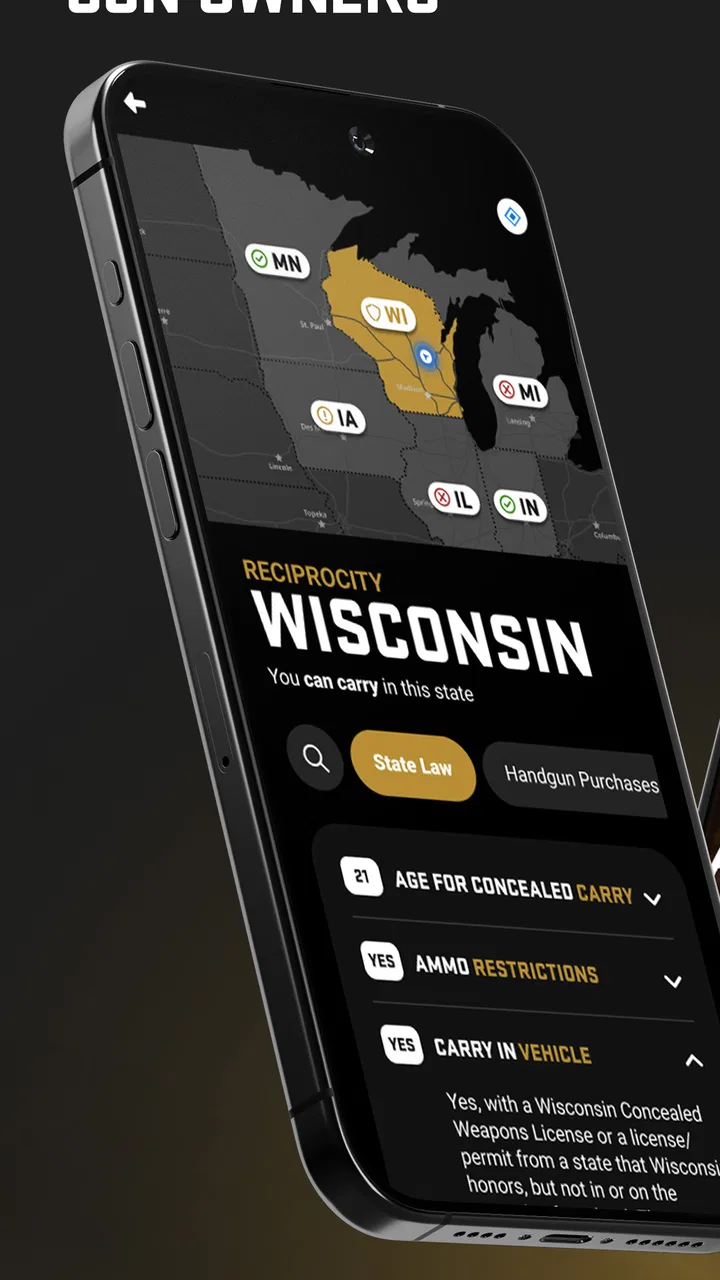
The app brings together three broad needs suggested by its design: checking reciprocity information, improving access to training material, and finding immediate support resources. Those areas overlap, but they are not interchangeable. A state reciprocity reference can help you prepare for travel; it cannot replace reading the current law or understanding the conditions attached to a permit. Training content can reinforce good habits; it cannot observe your handling or correct your technique in person. Support tools can help you find direction; they should not be mistaken for emergency response.
That separation is one of the first practical lessons I would give a new user. Open the app when you are calm and use it to build a personal routine. Do not wait until you are standing at a border, dealing with a stressful encounter, or trying to remember a safety step under pressure. The app has more value as a preparation companion than as a last-second solution.
The developer, The USCCA, places the product in the Education category, and that positioning feels appropriate. Even though the subject is connected to firearms, the useful mindset is learning and preparation rather than entertainment. I would not install it expecting a game-like experience, a social feed, or a general news reader. Its purpose is narrower and more practical: helping gun owners access information and support related to carrying responsibly.
What the free access actually means
The free price is a meaningful advantage because it lowers the barrier for someone who wants to explore the app before committing to anything else. You can decide whether the layout and subject matter fit your needs without first paying for access. That is especially helpful for occasional users who may only need a reference tool before a road trip or a refresher before attending training.
At the same time, I would avoid interpreting “free” as a guarantee that every possible service connected with the wider organization is included without conditions. The app itself is free to download, but a responsible buyer should distinguish that from paid classes, memberships, equipment, professional instruction, or other services that may exist outside the app. I would not base a purchase decision on assumed extras. The sensible approach is to use the free application on its own terms, then separately investigate any optional service before paying for it.
This distinction also affects how I judge value. The app does not need to replace a full course to be worthwhile. If it helps you remember to check rules before travel, locate relevant educational material, or keep support information accessible, it can justify its place on your device without pretending to be a complete training program. Its value is in reducing friction around preparation, not in eliminating the need for judgment.
Where it can save time in everyday use
A realistic example is a weekend drive through several states. Before leaving, I would use the app as one part of a larger checklist: confirm the route, review each jurisdiction’s current requirements, check restrictions that apply to the way I plan to carry, and then verify the information through official sources. The app can make the first pass more convenient, but I would not treat a quick screen as the final legal review. Laws can be detailed, conditional, and subject to change.
Another useful scenario is preparing for a first concealed-carry class. Rather than arriving with only vague expectations, I could use the educational material to identify topics I need to understand better, such as safe handling, decision-making, and the responsibilities that come with carrying. That preparation may help me ask a better question in class. It does not make the class unnecessary, because an instructor can evaluate behavior and explain context in a way a phone screen cannot.
I also see value for an experienced owner who wants a single reference point. Familiarity can create its own risk: once a routine feels automatic, people may stop reviewing it. A periodic check of educational resources and travel-related information can interrupt that complacency. The app is most effective here when used deliberately, not simply installed and forgotten.
Three practical habits that make it more useful
First, I would create a pre-trip routine around the app rather than opening it only at the last minute. Review the route early, note the jurisdictions involved, and write down questions that still need confirmation. This turns the app from a passive lookup tool into part of a broader preparation process. The non-obvious benefit is that it exposes uncertainty while there is still time to resolve it.
Second, I would pair its training material with an actual learning plan. After reading or reviewing a topic, identify one behavior to practice safely and one question to ask a qualified instructor. That prevents the common mistake of confusing recognition with competence. Knowing what a safety principle says is different from applying it consistently when distracted, rushed, or uncomfortable.
Third, I would keep support information separate from emergency assumptions. If the app offers a route to assistance, learn what that resource is intended to do before an incident occurs. In a genuine emergency, use the appropriate emergency channel first. The app can be part of your preparation, but it should never become the only plan you have.
Strengths, limitations, and who should use it
I find the app most useful when I treat it as a starting point for informed decisions, not as a shortcut around them. Its focused mix of carry-related reference material and learning resources can help me spot what I still need to check before traveling or training. That balance is worth keeping in mind as I weigh its practical strengths against the limits of relying on a phone app.
What I found valuable
The biggest strength is consolidation. Reciprocity, training, and support are often handled through different websites, documents, and conversations. Having them associated with one app makes it easier to remember that responsible carry involves more than owning equipment. It includes legal awareness, continuing education, and knowing where to seek help.
The free entry point is another clear benefit. Someone who is curious but not yet ready to spend money on a course or membership can explore the educational side first. That does not answer every question about long-term cost, but it gives the user a low-risk way to judge whether the app’s approach is useful.
I also appreciate that the app is relevant to more than one stage of ownership. A beginner can use it to organize questions before formal training. A permit holder can use it when preparing for travel. A more experienced owner can use it as a reminder to revisit habits and responsibilities. The same screen can serve different users, provided each person understands its limits.
Where I would be cautious
Legal information is the most important area for caution. Reciprocity is not always a simple yes-or-no question. Details can depend on permits, residency, age, location, method of carry, restricted places, vehicle rules, and other conditions. I would use the app to orient myself, then confirm critical points with current official sources or qualified legal guidance. Anyone who wants a single tap to settle every travel question may find the experience insufficient.
Training content also has a natural ceiling. A mobile app can explain, remind, and organize, but it cannot fully assess posture, handling, judgment, or reactions in a real instructional setting. If you are new to firearms, returning after a long break, or uncertain about safe storage and handling, an in-person course is the better next step. The app should support that process, not replace it.
There is also a difference between immediate convenience and durable understanding. A quick reference may help when you are planning, but repeated reading does not automatically create skill. I would be wary of users who download the app, skim a few screens, and conclude that they are prepared for every situation. Responsible carry demands more patience than that.
Compared with a general web search, the app offers a more focused starting point and less need to remember which resources to look for. Compared with official government pages, however, it may not be the final authority for a legal decision. Compared with a classroom, it is more convenient but less interactive and less capable of correcting mistakes. Compared with a dedicated emergency service, it should be viewed as a support reference rather than a replacement for direct help.
Who gets the most value
I would recommend trying it if you already own a firearm, are researching concealed carry, or travel across jurisdictions and want one organized place to begin your preparation. It is particularly suitable for people who appreciate checklists and reminders but do not want to assemble every resource manually. The free access makes experimentation easy, so you can decide whether it fits your habits without treating the download as a major financial commitment.
It may also help family members who want to understand the responsibilities around a gun-owning household. The Everyone 10+ rating makes the app broadly accessible from an age-classification standpoint, but responsible adult supervision and context still matter when discussing firearms with younger users. An age label is not a substitute for family judgment or safety education.
I would tell a complete beginner to use it alongside formal instruction, not instead of it. If your main goal is hands-on technique, safe storage guidance tailored to your home, or feedback from a qualified teacher, look for an instructor or course first. If your main goal is entertainment, competitive shooting statistics, or a broad firearm marketplace, this is probably not the right app.
It is also not ideal for someone who wants a definitive legal answer without doing any additional checking. The app can help you ask the right questions, but the responsibility for confirming current rules remains with you. That may feel like extra work, yet it is the safer trade-off for a subject where small details can matter.
Performance context and practical expectations
The app has been available since June 23, 2017, and its current version is 2.0.19. It has passed the half-million-install mark and holds an average rating of 3.9 from roughly 1.7 thousand ratings, with more than 900 written reviews. Those figures suggest that it has reached a substantial audience while leaving room for mixed experiences. I would read that combination as a reason to try it personally rather than assuming it will suit every phone and every workflow.
Because the minimum operating-system requirement is Android 7.0, owners of very old devices should check compatibility before planning around it. For most users with a supported phone, the more relevant question is not raw availability but whether the app’s organization matches how they prepare. If you prefer official documents, printed references, or direct instruction, the app may remain secondary even when it works perfectly.
My buy-or-skip verdict
My recommendation is to try it if you want a free, focused preparation companion for concealed-carry education and travel-related research. The absence of an upfront price makes the decision easy, and the combination of reference material, learning support, and assistance-oriented resources is more useful than keeping those needs completely separate.
I would not present it as a complete safety system or a legal authority. Its best role is the first layer of preparation: review the material, build a checklist, identify uncertainties, and then confirm important details through appropriate official or professional channels. For hands-on competence, add formal instruction. For urgent danger, contact emergency services. For complex legal questions, seek qualified advice.
In the end, I see the app as worthwhile for the right user because it encourages a broader view of responsible ownership. It is not just about carrying; it is about learning, checking, and planning. If that is the kind of support you want on your phone, the free download is easy to justify. If you want one app to replace training, current legal research, and real-world judgment, I would skip it and invest your time in those direct alternatives instead.
USCCA Concealed Carry App works best when it is treated as a convenient companion, not as permission to stop thinking. That is both its practical strength and its clearest limitation.
FAQs for USCCA Concealed Carry App
01What features does the USCCA Concealed Carry App offer?
The USCCA Concealed Carry App provides a comprehensive set of features designed to enhance the experience of concealed carry permit holders. It includes interactive maps of state gun laws, a reciprocity map, a training log, a digital copy of USCCA membership card, and access to resources like articles, videos, and emergency contact information.
02Is the USCCA Concealed Carry App available for both Android and iOS?
Yes, the USCCA Concealed Carry App is available for download on both Android and iOS platforms. You can find it on the Google Play Store for Android devices and the Apple App Store for iOS devices, ensuring compatibility with a wide range of smartphones and tablets.
03Does the app provide real-time updates on gun laws?
The app is designed to provide timely updates on gun laws. It includes an interactive map feature that shows current state laws and reciprocity agreements. However, it's always wise to double-check any critical legal information with official state resources or legal counsel to ensure accuracy.
04How secure is my personal data within the app?
The USCCA Concealed Carry App prioritizes user privacy and data security. It employs industry-standard encryption and security measures to protect personal information. However, users should always be cautious about sharing sensitive data and regularly update their app to benefit from the latest security enhancements.
05Is there a cost associated with using the USCCA Concealed Carry App?
The app is free to download, but certain features and resources may require a USCCA membership. Membership provides additional benefits, including access to exclusive content, training resources, and legal defense protection. Users can explore the app's basic features without a membership to decide if they find value in upgrading.
Pros
- Comprehensive training resources available.
- Interactive maps for legal guidance.
- User-friendly interface for easy navigation.
- Regular updates with new content.
- 24/7 customer support for quick help.
Cons
- Limited features without premium subscription.
- Requires internet for most functionalities.
- Occasional lag on older devices.
- Some content locked behind paywall.
- User interface could use more customization.

USCCA Concealed Carry App
Gallery